Can't find the right component?
Describe it and Shuffle AI builds it in seconds, ready to edit and export.
Browse 7,300+ ready-made Tailwind CSS components across 60 categories. Every variant is fully responsive – copy the code or customize it in the visual editor and export clean code.
Create a free account to copy production-ready code from every component in the library.
Free account · No credit card · No password needed
Already have an account? Sign in
Components are just the start. See how a project goes from prompt to production‑ready code with Shuffle.
A dark-themed blog index page with a centered hero heading, subtitle, search input, and category filter tabs above a two-column grid of article cards. Each card shows an image, category badge, author and date, title, excerpt, and a Read Post link, followed by a View more button.
Create a free account to copy production-ready code from every component in the library.
Free account · No credit card · No password needed
Already have an account? Sign in
Components are just the start. See how a project goes from prompt to production‑ready code with Shuffle.
A long-form article page with a centered byline, title, subtitle, category tag, full-width hero photo, and body text. It includes a green-bordered pull quote, an inline image with caption, section headers, lists, a text link, and a bottom row with a Copy Link button and social share icons.
Create a free account to copy production-ready code from every component in the library.
Free account · No credit card · No password needed
Already have an account? Sign in
Components are just the start. See how a project goes from prompt to production‑ready code with Shuffle.
Create a free account to copy production-ready code from every component in the library.
Free account · No credit card · No password needed
Already have an account? Sign in
Components are just the start. See how a project goes from prompt to production‑ready code with Shuffle.
A team section with a small TEAM label, a bold heading and subtitle, and a 4-by-2 grid of member cards. Each card shows a circular headshot, name, green role title, short quote, and gray social icons on a light background.
Create a free account to copy production-ready code from every component in the library.
Free account · No credit card · No password needed
Already have an account? Sign in
Components are just the start. See how a project goes from prompt to production‑ready code with Shuffle.
A centered careers section with a small 'We Are Hiring' badge, a bold 'Join our team' heading, and supporting text, followed by a vertical stack of five white job cards each showing a role title and a green 'View Job' link with arrow icon. The light background and simple card layout give it a minimal, recruitment-focused appearance.
Create a free account to copy production-ready code from every component in the library.
Free account · No credit card · No password needed
Already have an account? Sign in
Components are just the start. See how a project goes from prompt to production‑ready code with Shuffle.
A centered careers section with a "We are hiring" badge, heading, and intro text above five stacked job cards, each with a title and green "View Job" link with an arrow icon. Cards are evenly spaced in a single vertical column on a dark slate background.
Create a free account to copy production-ready code from every component in the library.
Free account · No credit card · No password needed
Already have an account? Sign in
Components are just the start. See how a project goes from prompt to production‑ready code with Shuffle.
A dark-background pricing section headed "Flexible pricing plan for your startup" with three white cards comparing Basic, Freelancer, and Enterprise plans. Each card lists prices, billing text, green checkmark features, and a green Request a Demo button.
Create a free account to copy production-ready code from every component in the library.
Free account · No credit card · No password needed
Already have an account? Sign in
Components are just the start. See how a project goes from prompt to production‑ready code with Shuffle.
Create a free account to copy production-ready code from every component in the library.
Free account · No credit card · No password needed
Already have an account? Sign in
Components are just the start. See how a project goes from prompt to production‑ready code with Shuffle.
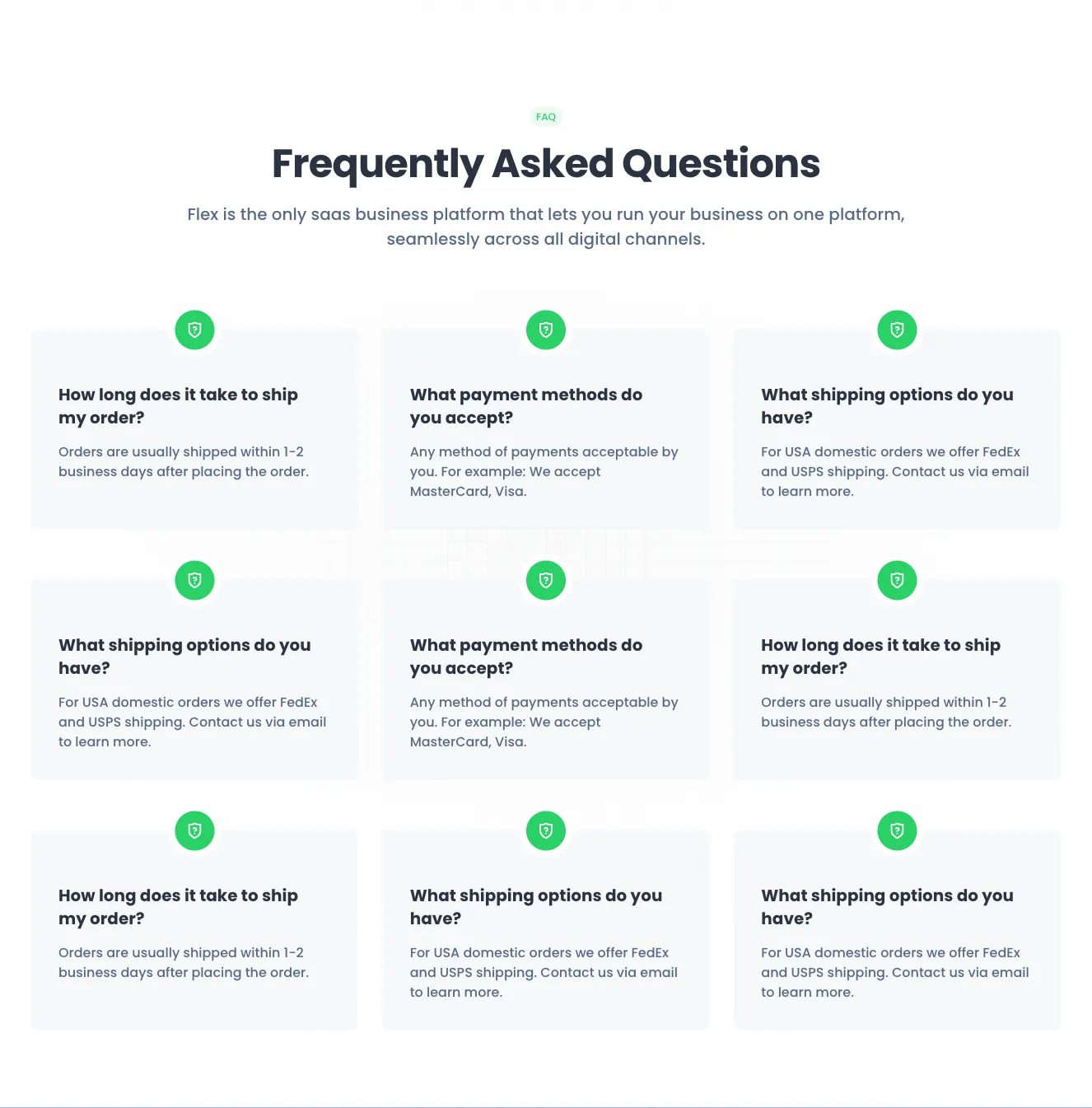
A light-themed FAQ section with a centered heading, subtitle, and a 3x3 grid of white cards, each with a green shield-question icon, a bold question, and a short answer about shipping and payment. The layout is a centered header above a repeated card grid.
Create a free account to copy production-ready code from every component in the library.
Free account · No credit card · No password needed
Already have an account? Sign in
Components are just the start. See how a project goes from prompt to production‑ready code with Shuffle.
Create a free account to copy production-ready code from every component in the library.
Free account · No credit card · No password needed
Already have an account? Sign in
Components are just the start. See how a project goes from prompt to production‑ready code with Shuffle.
A white card titled Schedule showing a vertical list of meetings with time and location metadata, a Today/Tomorrow segmented control in the header, and a See all schedules button at the bottom. Rows are separated by thin dividers.
Create a free account to copy production-ready code from every component in the library.
Free account · No credit card · No password needed
Already have an account? Sign in
Components are just the start. See how a project goes from prompt to production‑ready code with Shuffle.
Create a free account to copy production-ready code from every component in the library.
Free account · No credit card · No password needed
Already have an account? Sign in
Components are just the start. See how a project goes from prompt to production‑ready code with Shuffle.
Create a free account to copy production-ready code from every component in the library.
Free account · No credit card · No password needed
Already have an account? Sign in
Components are just the start. See how a project goes from prompt to production‑ready code with Shuffle.
A light-background FAQ section with an eyebrow label, centered heading and subtitle, and a three-by-three grid of cards each containing a green question-mark shield icon, a question, and a short answer. The layout is purely informational with no visible interactive controls.
Create a free account to copy production-ready code from every component in the library.
Free account · No credit card · No password needed
Already have an account? Sign in
Components are just the start. See how a project goes from prompt to production‑ready code with Shuffle.
A settings form for editing personal information, including name, email, photo upload, role, country, timezone, domain fields, and bio. It has a header with Cancel and Save buttons and uses a white card with labeled rows separated by thin dividers.
Create a free account to copy production-ready code from every component in the library.
Free account · No credit card · No password needed
Already have an account? Sign in
Components are just the start. See how a project goes from prompt to production‑ready code with Shuffle.
Create a free account to copy production-ready code from every component in the library.
Free account · No credit card · No password needed
Already have an account? Sign in
Components are just the start. See how a project goes from prompt to production‑ready code with Shuffle.
Create a free account to copy production-ready code from every component in the library.
Free account · No credit card · No password needed
Already have an account? Sign in
Components are just the start. See how a project goes from prompt to production‑ready code with Shuffle.
Create a free account to copy production-ready code from every component in the library.
Free account · No credit card · No password needed
Already have an account? Sign in
Components are just the start. See how a project goes from prompt to production‑ready code with Shuffle.
Create a free account to copy production-ready code from every component in the library.
Free account · No credit card · No password needed
Already have an account? Sign in
Components are just the start. See how a project goes from prompt to production‑ready code with Shuffle.
A row of four identical white profile cards, each showing a circular avatar, name, email, a green Message button with envelope icon, and a footer with Posts, Following, and Followers counts. The layout is a horizontal grid of user profile cards with a light background.
How you’ll build with Shuffle.
© 2026 Shuffle. All rights reserved.
See what you're getting before you commit.
Switch the editor to Grid and every page of your project appears side by side on one canvas. Arrange them freely, zoom in and out, and add as many new pages as you need in a few clicks.
Describe what you need in one chat and the Agent does the rest: it adds new sections, edits copy and styles, moves blocks around or removes them across your whole page. No modes, no switching, just tell it what to change.
Not quite there yet? Ask for tweaks like missing assets, your logo or other details, and regenerate the design without starting from scratch.