Can't find the right component?
Describe it and Shuffle AI builds it in seconds, ready to edit and export.
Browse 249 ready-made Tailwind CSS newsletter components from multiple UI libraries. Every variant is fully responsive – copy the code or customize it in the visual editor and export clean code.
Create a free account to copy production-ready code from every component in the library.
Free account · No credit card · No password needed
Already have an account? Sign in
Components are just the start. See how a project goes from prompt to production‑ready code with Shuffle.
A split-screen newsletter signup section with a bold heading, supporting subtext, and an email input paired with an orange Subscribe button on the left, and a rounded orange panel featuring a 3D ghost illustration on the right. Decorative thin circles and a small star accent add visual interest without functional controls.
Create a free account to copy production-ready code from every component in the library.
Free account · No credit card · No password needed
Already have an account? Sign in
Components are just the start. See how a project goes from prompt to production‑ready code with Shuffle.
A dark, purple-gradient promotional banner with a large heading, short supporting text, and an inline input field paired with an action button for newsletter subscription. The content is arranged in a split layout with text on the left and the input group on the right.
Create a free account to copy production-ready code from every component in the library.
Free account · No credit card · No password needed
Already have an account? Sign in
Components are just the start. See how a project goes from prompt to production‑ready code with Shuffle.
A centered newsletter subscription section with an envelope icon, bold heading, supporting text, name and email inputs, and a purple Subscribe Now button. A small privacy note appears beneath the button.
Create a free account to copy production-ready code from every component in the library.
Free account · No credit card · No password needed
Already have an account? Sign in
Components are just the start. See how a project goes from prompt to production‑ready code with Shuffle.
A centered newsletter subscription section on a black background with an envelope icon, heading, supporting text, two text inputs for name and email, and a gradient SUBSCRIBE NOW button with a privacy note below. The layout is a vertical stack of form elements.
Create a free account to copy production-ready code from every component in the library.
Free account · No credit card · No password needed
Already have an account? Sign in
Components are just the start. See how a project goes from prompt to production‑ready code with Shuffle.
A split-screen newsletter signup section with a "Newsletter" badge, a large "Subscribe" heading, supporting text, an email input, and an orange subscribe button. The left side shows an illustrative app mockup of a study session with lesson cards and images.
Create a free account to copy production-ready code from every component in the library.
Free account · No credit card · No password needed
Already have an account? Sign in
Components are just the start. See how a project goes from prompt to production‑ready code with Shuffle.
Two rounded promotional cards placed side by side: a white card with a centered 'Start your journey with us' heading and a blue 'Join our Team' button, and a blue card with a centered 'Subscribe and receive updates' heading, an email input, and a white 'Sign In' button. The layout presents two distinct calls to action with eyebrow labels above each heading.
Create a free account to copy production-ready code from every component in the library.
Free account · No credit card · No password needed
Already have an account? Sign in
Components are just the start. See how a project goes from prompt to production‑ready code with Shuffle.
A split-screen newsletter signup section with a dark left panel containing a lime eyebrow label, large headline, supporting text, email input, and a lime Subscribe button. The right side displays a full-height lifestyle photograph of a person seated on steps.
Create a free account to copy production-ready code from every component in the library.
Free account · No credit card · No password needed
Already have an account? Sign in
Components are just the start. See how a project goes from prompt to production‑ready code with Shuffle.
A dark navy promotional banner with a bold heading, supporting text, and an inline email input paired with a light blue Sign up button arranged horizontally. It functions as a compact newsletter subscription call-to-action section.
Create a free account to copy production-ready code from every component in the library.
Free account · No credit card · No password needed
Already have an account? Sign in
Components are just the start. See how a project goes from prompt to production‑ready code with Shuffle.
A minimal light-background section with a numbered label, large centered heading, and a horizontal row containing an email input and purple 'Sign Me' button. It functions as a newsletter subscription form.
Create a free account to copy production-ready code from every component in the library.
Free account · No credit card · No password needed
Already have an account? Sign in
Components are just the start. See how a project goes from prompt to production‑ready code with Shuffle.
A dark promotional banner with a blue corner accent, a "Subscribe now" heading, and a pill-shaped email input with a blue Subscribe button beneath. Decorative sparkle shapes and a faint circle sit on the right side, and a short line of supporting text appears below the form.
Create a free account to copy production-ready code from every component in the library.
Free account · No credit card · No password needed
Already have an account? Sign in
Components are just the start. See how a project goes from prompt to production‑ready code with Shuffle.
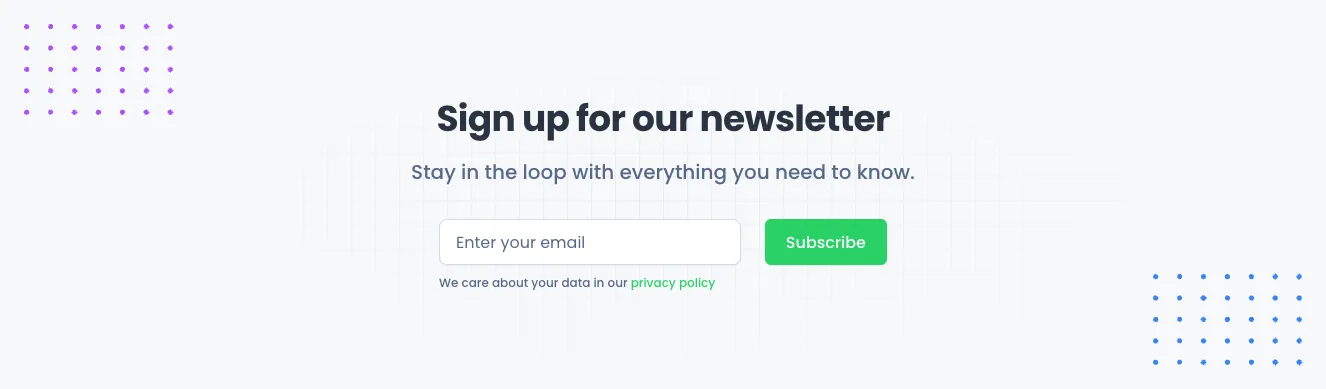
A centered light section with a bold heading, subtitle, email input field, green Subscribe button, and privacy policy note. Decorative purple and blue dot grids frame the corners, and the form is arranged in a single horizontal row beneath the text.
Create a free account to copy production-ready code from every component in the library.
Free account · No credit card · No password needed
Already have an account? Sign in
Components are just the start. See how a project goes from prompt to production‑ready code with Shuffle.
A light-background newsletter section with a small eyebrow label, a large 'Stay updated' heading, supporting text, and a horizontal row containing a labeled email input and a blue 'Get started' call-to-action button.
Create a free account to copy production-ready code from every component in the library.
Free account · No credit card · No password needed
Already have an account? Sign in
Components are just the start. See how a project goes from prompt to production‑ready code with Shuffle.
A centered blue promotional card with the Yofte logo, a bold heading, supporting text, and a single email input paired with a dark JOIN button. It functions as a newsletter subscription call to action with decorative pill shapes in the background.
Create a free account to copy production-ready code from every component in the library.
Free account · No credit card · No password needed
Already have an account? Sign in
Components are just the start. See how a project goes from prompt to production‑ready code with Shuffle.
A centered newsletter sign-up section with a bold heading, supporting text, a single input field labeled 'Search now...', and a lime green Subscribe button. Decorative blue side panels with diagonal lime stripes and orange wavy lines frame the content on a white background.
Create a free account to copy production-ready code from every component in the library.
Free account · No credit card · No password needed
Already have an account? Sign in
Components are just the start. See how a project goes from prompt to production‑ready code with Shuffle.
A centered newsletter signup section with a small pink eyebrow label, a bold heading, a supporting line, and an inline email field paired with a dark navy Subscribe button. A short privacy policy note sits beneath the form.
Create a free account to copy production-ready code from every component in the library.
Free account · No credit card · No password needed
Already have an account? Sign in
Components are just the start. See how a project goes from prompt to production‑ready code with Shuffle.
A light, centered hero section with a multicolor logo mark, a bold two-line headline, short gray supporting text, and an inline email input paired with a purple Sign Up button. It serves as a marketing introduction with a single lead-capture call to action.
Create a free account to copy production-ready code from every component in the library.
Free account · No credit card · No password needed
Already have an account? Sign in
Components are just the start. See how a project goes from prompt to production‑ready code with Shuffle.
A dark full-width newsletter signup section with a bold serif-style heading, supporting text, and a pill-shaped email input with a yellow Go button. A blob-shaped portrait photo on the right adds a visual accent against the black background.
Create a free account to copy production-ready code from every component in the library.
Free account · No credit card · No password needed
Already have an account? Sign in
Components are just the start. See how a project goes from prompt to production‑ready code with Shuffle.
A full-width teal banner with a serif heading, supporting text, and a horizontal row containing an email input field and a white Sign up button. The content is split into a left text block and a right form area.
Create a free account to copy production-ready code from every component in the library.
Free account · No credit card · No password needed
Already have an account? Sign in
Components are just the start. See how a project goes from prompt to production‑ready code with Shuffle.
A horizontal newsletter subscription banner on a blue background, with a bold heading and supporting text on the left and an email input paired with a yellow Sign Up button on the right. The light card-like panel contains the form and promotional copy in a single row.
Create a free account to copy production-ready code from every component in the library.
Free account · No credit card · No password needed
Already have an account? Sign in
Components are just the start. See how a project goes from prompt to production‑ready code with Shuffle.
A centered hero section with a two-line bold heading, a muted subheading, and an inline email input paired with a blue Sign Up button. It is a simple light-background landing section for collecting email addresses.
Newsletters are the bread and butter of any business. Our Tailwind components newsletter will allow you to build your mailing base effectively.
Choose from many variations of the Tailwind components newsletter. The variants shown here are available in various UI libraries in the Shuffle editor. You will also find many other types of components that will be in the same style. This will allow you to build a comprehensive Tailwind website template. Each library is designed by a professional designer and coded by our team of developers.
Get access to all sections of the Tailwind components newsletter, code and our editor. Try the demo for free.
How you’ll build with Shuffle.
© 2026 Shuffle. All rights reserved.
See what you're getting before you commit.
Switch the editor to Grid and every page of your project appears side by side on one canvas. Arrange them freely, zoom in and out, and add as many new pages as you need in a few clicks.
Describe what you need in one chat and the Agent does the rest: it adds new sections, edits copy and styles, moves blocks around or removes them across your whole page. No modes, no switching, just tell it what to change.
Not quite there yet? Ask for tweaks like missing assets, your logo or other details, and regenerate the design without starting from scratch.