Redirecting to PayPal

UI Components – Flow Library

Browse 293 ready-made components from the Flow UI library. Every variant is fully responsive – copy the code or customize it in the visual editor and export clean code.

Tailwind Component #41

Content component in Tailwind

Solar Energy Blog Article Page with Newsletter Signup and Related Posts

A full blog article page about solar energy with a dark green hero header, author and share sidebars, body text sections, an email newsletter signup card, a testimonial quote, and a row of related article cards at the bottom.

Tailwind Component #42

Footers component in Tailwind

Footer with link columns and newsletter signup

A website footer on a cream background with a Flow logo, three link columns (Platform, Resources, Company), and a dark green newsletter card with an email input and a lime 'Get in touch' button. Social icons and a copyright line sit along the bottom edge.

Tailwind Component #43

Sign in / Sign up component in Tailwind

Tailwind Component #44

Team component in Tailwind

Meet Our Experts Team Grid on Dark Green Background

A dark green section titled 'Meet our experts' with a six-card grid of lime green cards, each showing a circular headshot, a name, and a job title. The layout is a three-column grid with two rows, presenting team members in a simple, repeated structure.

Tailwind Component #45

Pricing component in Tailwind

Pricing Plans with Feature Comparison Table

A dark-themed pricing section presenting three plan cards (Basic, Basic recommended, Enterprise) with price and Get started buttons, followed by a comparison table of support and energy supply benefits across the plans. The recommended plan is highlighted with a bright green card and a Recommended label.

Tailwind Component #46

Call to action component in Tailwind

Dark green call-to-action banner with heading and lime button

A full-width dark green rounded banner with a large white heading, a short supporting sentence, and a lime pill-shaped 'Get in touch' button on the right. It functions as a promotional call-to-action section for contacting or engaging with a green energy initiative.

Tailwind Component #47

About component in Tailwind

Centered About Us Hero Section with Read More Button

A centered introductory text section with a large heading "About us", a multi-line mission paragraph, and an outlined "Read more" call-to-action button on a cream background with faint diagonal line texture. It presents company mission content without images or navigation.

Tailwind Component #48

Blog component in Tailwind

Blog Article Card Grid with Header and See All Button

A blog section with a large heading, subtitle, and a 'See all' pill button above two large article cards and three smaller article cards. Each card shows a photo, title, excerpt or title only, author avatar, name, and read time on a cream background.

Tailwind Component #49

Newsletter component in Tailwind

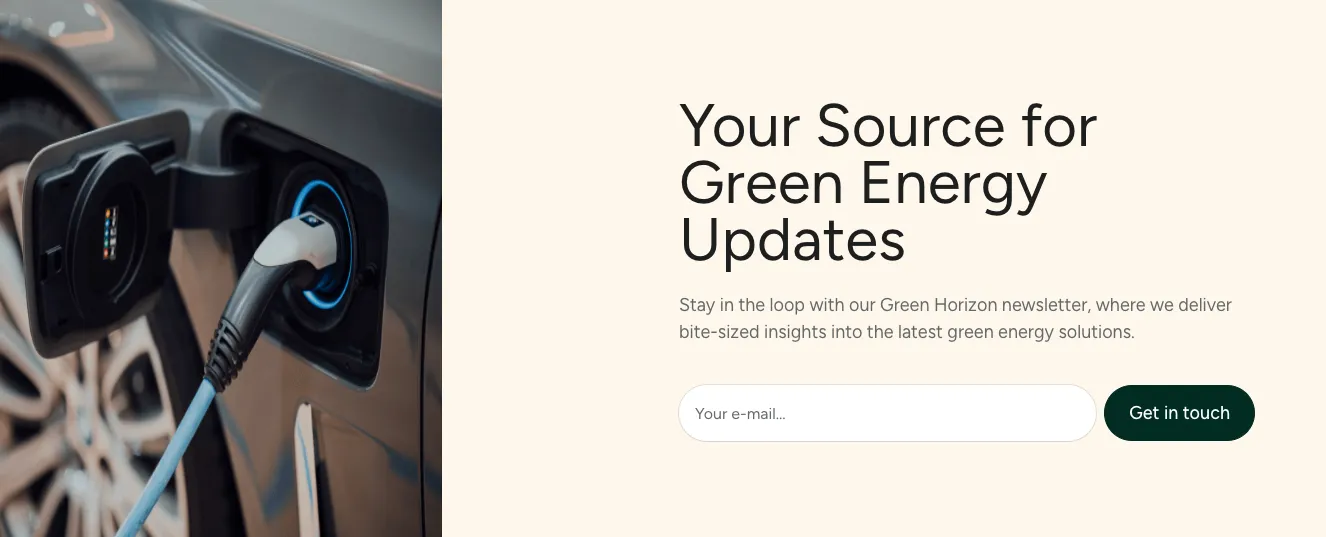
Split-screen newsletter signup hero with EV charging photo

A split-screen hero section with an electric vehicle charging photograph on the left and a cream panel on the right containing a heading, supporting text, and an email signup field with a dark call-to-action button. It is a promotional newsletter subscription section for a green energy brand.

Tailwind Component #50

Cookies component in Tailwind

Dark Green Privacy Settings Cookie Consent Banner

A horizontal dark green consent banner with a Privacy Settings heading and explanatory text about third-party tracking on the left, and Deny (outlined) and Accept All (lime filled) pill buttons on the right. It is a single-row notification-style banner.

Tailwind Component #51

Testimonials component in Tailwind

Testimonial Carousel with Star Rating and Navigation Arrows

A testimonials section with a centered heading, subtitle, and a single featured customer quote card with five green stars, a quote, and attribution. Left and right arrow buttons sit beside a stacked card effect suggesting additional testimonials in a carousel.

Tailwind Component #52

Careers component in Tailwind

Job Listings Grid with Department Sections and Apply Cards

A careers section headed "Join our team" with grouped job openings under department labels (R&D, Engineering), each shown as a white card with a lime top accent, location and employment-type pills, and an Apply link. The cards are arranged in multi-column grids with generous spacing on a cream background.

Tailwind Component #53

HTTP codes component in Tailwind

404 Not Found Error Page with Back to Home and Support Buttons

A centered error state displaying a large lime-green 404 heading, a short explanatory message, and two buttons: a filled dark green 'Back to home' button and an outlined 'Support' button. The light background has a soft green gradient glow on the upper left.

Tailwind Component #54

FAQ component in Tailwind

FAQ accordion section with green energy questions and support prompt

A centered FAQ section with a large heading, subtitle, and a two-column list of collapsed question rows marked with plus icons. A footer prompt with a lime support icon, a Contact Us link, and a hotline number invites further questions.

Tailwind Component #55

Navigation (horizontal) component in Tailwind

Dark Green Top Navigation Bar with Logo, Links, Login and CTA

A horizontal top navigation bar on a dark green background with the Flow logo at left, text links for About us, Team, Solutions and Blog, and right-aligned Login outlined button and a lime green Get in touch call-to-action button.

Tailwind Component #56

Footers component in Tailwind

Tailwind Component #57

Sign in / Sign up component in Tailwind

Tailwind Component #58

Logo clouds component in Tailwind

Tailwind Component #59

Features component in Tailwind

Tailwind Component #60

Team component in Tailwind

The easiest way to create beautiful websites

The selected plan includes lifetime access to Shuffle Editor.

Lifetime License

Create an account

OR USE EMAIL

VAT included where applicable. Invoices provided.

Why creators choose Shuffle

From idea to beautiful design in minutes.

Shuffle pairs an AI visual editor with 80+ UI libraries, so you can design, build and export production‑ready code without starting from scratch.

  • An AI Agent that builds with you Describe a page, watch it come to life, then fine-tune it visually or with a prompt.
  • Pick the best model for every task GPT-6 Astra, Claude Opus 5.5 and Gemini 4 Argon in one place.
  • 13,400+ professionally designed components Prefer building by hand? Drag in pixel-perfect sections crafted by professional designers.
  • Export to the stack you love Next.js, Astro, Laravel, WordPress, Shopify, static HTML and beyond.
“Its AI-powered features have transformed how I work! Designing and building websites has become faster, easier, and far more efficient.”
Est. 2019
Helping web builders ship since 2019 7 years of steady development.

Make it yours with AI

Start with this component. Tell AI what to change.

Original
Preview the original component.
Your Version
Available when your generation is complete.
Code
Available when your generation is complete.
Original component

Add images & videos

Upload an asset, then tell AI how to use it.

How it works

Your uploaded file will be added directly to the generated component. After uploading, you can guide the AI on where exactly to use it, e.g. as a logo or as a section image.

© 2026 Shuffle. All rights reserved.