Shuffle's Editors





Shuffle’s design systems
















Design mobile app screens with AI.
Start with a prompt and watch multiple iOS or Android screens come to life. Compare them side by side, pick the winner, add more screens, and import them into Figma.
Describe your app screen
Name the app, the screen you need, its main content, and the style. All models design it in parallel.
Turn your screen into a finished app design.
You have a direction. Upgrade to design the rest of the app and take it to Figma.
- Design every screen of your app
- Polish every detail in the visual editor
- Import the screens into Figma
- Keep generating fresh AI designs as you go
Design a screeon of music player in a premium, modern music-listening app inspired by Spotify, Apple Music, and SoundCloud, but with a unique visual identity and a fresh user experience.
Prompt Builder
Set your website's structure and styling with a clear, precise prompt.
Configure your sections
Prompt improvement
See every design at a glance and compare them side by side. 2 per row
Bigger previews that make it easier to judge details.
Anthropic / Claude Opus 5.5
Available on Desktop
OpenAI / GPT-6
Available on Desktop
Google / Gemini 4 Argon
Available on Desktop
Google / Gemini 3.8 Flash
Stop ?
Most designs are ready in about 2 minutes. If you stop now, this design won’t be saved. The other models keep generating.
This generation already counts toward your demo limit, so stopping won’t give it back. Need more tries? A Lifetime License includes 1,000 AI generations every month.
Learn how to edit generated projects
Once you pick your favorite AI-generated redesign, open it in Shuffle and start customizing. Adjust layouts, swap components - all visually or with AI, no coding required.
- ✓ Edit any element with a click.
- ✓ Export to Next.js, Laravel, WordPress, and more.
- ✓ Production-ready clean code, every time.
Featured designs
Explore community-generated prompts and their live AI design results.
Design a screeon of music player in a premium, modern music-listening app inspired by Spotify, Apple Music, and SoundCloud, but with a unique visual identity and a fresh user experience.
Remix this designOne prompt, multiple app screens, straight to Figma
Leading AI models design the same screen following native iOS or Material 3 patterns, so you can compare directions, keep the best one, and continue in Figma.
Pick a platform and describe the screen
Choose iOS or Android, then describe the app, the screen, its content, and the style you want.
Compare phone screens
Every model designs the screen in parallel. Review them side by side in real phone proportions.
Add more screens
Open the winner in Shuffle and add new pages. Each new screen reuses the same status bar, navigation, colors, and type.
Import into Figma
Copy the screen URLs from the Figma export and import them with the html.to.design plugin, or export the code instead.
Write prompts for better app screens
"Checkout screen of a grocery app" beats "a grocery app". One focused screen gives every model a clear target.
Mention the header, key components, lists, and actions in order. Include the tab bar items if the app has them.
Add cues like "calm pastel", "premium dark", or "playful and bold" to steer colors, imagery, and typography.
Design Better Mobile Apps, Faster
From app concepts to client projects, turn your ideas into professional mobile app screens with AI, then import your designs into Figma.
The Shuffle Advantage
All-in-One Toolkit
Get access to everything you need to create beautiful websites: Shuffle Editor, Multi-AI Designer, Components Gallery, and Design CLI.
No Lock-In
Export code to Next.js, Astro, Laravel, WordPress, static HTML, and more.
10x Faster Development
AI creates layouts in seconds so you can stay focused on building, not designing.
Prefer a subscription?
Same core features, billed on repeat.
The selected plan includes lifetime access to Multi-AI Designer and Shuffle Editor.
Add your own assets to the design
The AI will include it in the generated projects (upload logo, icons, videos, or other visual elements).
Reference uploads are available only for new designs.
In redesign mode, the URL you provide is already used as the reference. To use a standalone screenshot/mockup instead, switch mode to the new website and upload it there.
Uploading file, please wait
How it works
Your uploaded file will be added directly to the generated section. After uploading, you can guide the AI on where exactly to use it, e.g. as a logo or as a section image.
The AI will scan your image and use it as a UX/UI suggestion (layout, structure, colors and style) for the new design. The image itself won't be placed in the project.
Your prompt extension
Clearly tell the AI where to insert the asset and how to position any related content (for example, "Use it as a logo").

Build websites faster with an AI Visual Editor



Products
Extensions
UI Components
Company
© 2026 Shuffle. All rights reserved.
Your next idea deserves a design
Keep creating with Multi-AI Designer
You created your last Multi-AI Design on .
You've used your free Multi-AI Design demo.
The free demo includes one Multi-AI Design try.
Your projects are ready!
Customize your favorites and export directly from Shuffle.

- Edit images and text visually, so you can move fast without touching code.
- Add more pages to give your website a complete foundation.
- Export code in Next.js, Astro, Laravel, WordPress, static HTML, and more.
Demo projects are marked for deletion after 6 hours. To keep your work, sign up for a full account.
What's new
See what you're getting before you commit. We ship new updates every day.
The AI Agent just got a lot more powerful
Describe what you need in one chat and the Agent does the rest: it adds new sections, edits copy and styles, moves blocks around or removes them across your whole page. No modes, no switching, just tell it what to change.
Multi-AI Designer can now regenerate designs
Not quite there yet? Ask for tweaks like missing assets, your logo or other details, and regenerate the design without starting from scratch.
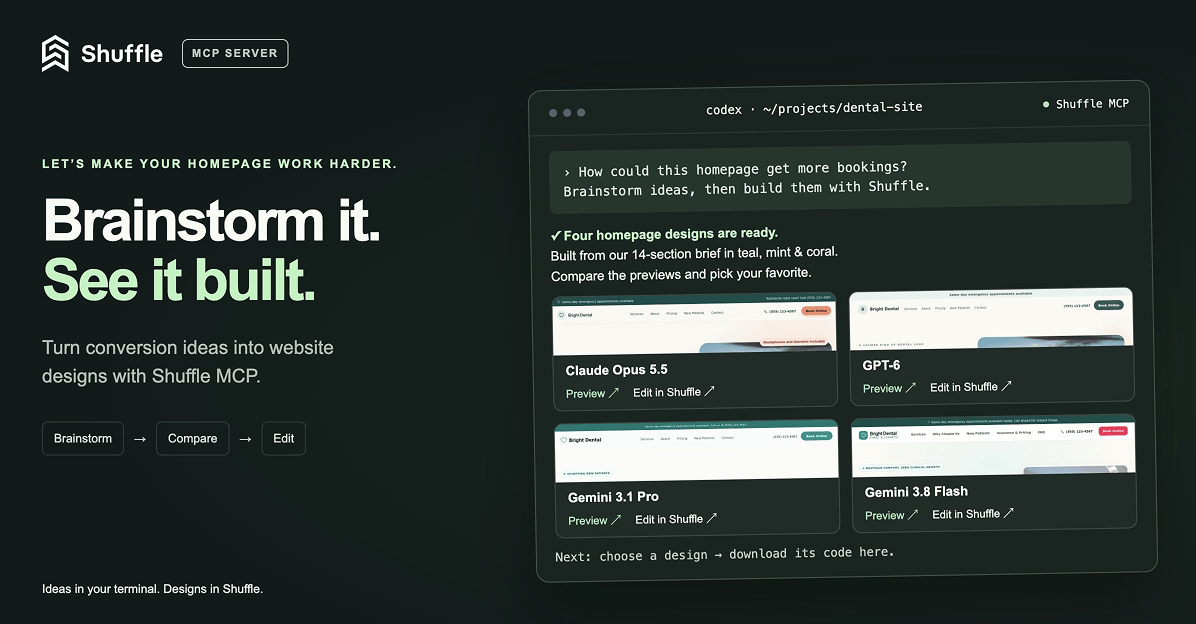
Meet Shuffle’s MCP server ✨
Ask Codex or Claude in your project, “How can I make the homepage convert better?”, then brainstorm, generate new designs with Shuffle right from your terminal, compare previews and bring the code you like straight into your project. (Read more)