



Blog homepage » Entry
Bootstrap Shuffle June 29, 2020

Build your own UI components, VISUALLY!

Benedykt Michalski

Inspirational Writer

A month ago, we published a blog post with instructions on how to create components using Custom HTML feature (you can read it: here).

Today, we have an even bigger announcement! You can build your own UI components, VISUALLY!

How?

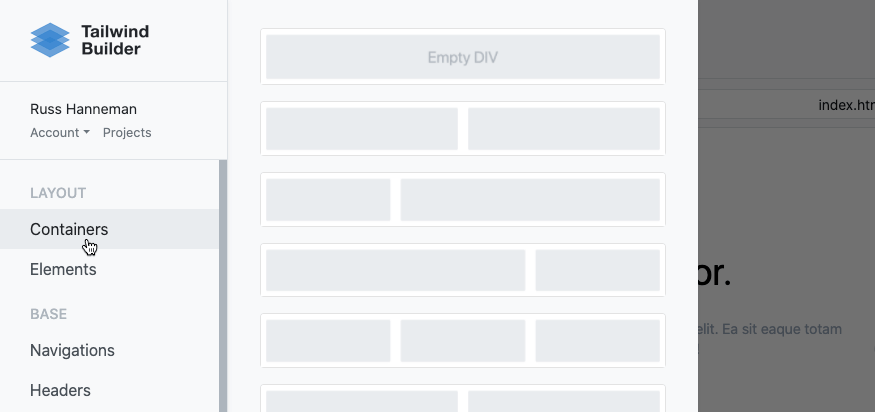
There are new options in the menu: Containers and Elements.

Containers are unique components that allow you to drop other components into them. So that you can build, e.g., grid structures.

Elements are low-level UI components (button, paragraph, etc.) that allow you to build more advanced UI structures (e.g., header section).

Below you can watch a short video (only 45s) where I re-create one of our Headers section from Tailwind Builder:

Please note that this feature is available in all our editors:

Related blog posts

AI May 6, 2026

How AI Email Design Tool Helps You Create Better Email Campaigns Faster

Email marketing still depends on one thing above all: getting the right message in front of people in a format they actually want to read.

Benedykt Michalski

Inspirational Writer

Browser extensions for Shuffle
AI April 8, 2026

AI Website Redesign Browser Extension: Redesign Local and Protected Websites

If you want to redesign an existing website with AI, a public URL is not always enough.

Benedykt Michalski

Inspirational Writer

Learning January 29, 2026

Why Do Most AI-Generated Websites Look the Same?

Most AI-generated websites look the same because they are created from vague prompts that lack layout structure, design constraints, and clear visual intent.

Benedykt Michalski

Inspirational Writer

© 2022 Shuffle. All rights reserved.